Tuesday, 6 December 2016

Process Evaluation Of Ultra Short Film

Software Application

Software applications is when we used  an editing software to make and continue our projects. This is a source that is digital and is available on laptops and computers, and has easy access to through these devices. The software's help put together videos to make films.

The digital software that we used to make our films in the post production process is called Final Cut X, which was available to access on the macs provided, we used this for the editing and uploading of our short films. This software is only available on apple products and is a very advanced program for editing films.

This had a big impact on our work since it allowed me to know how to use advanced editing software's, and the software that I used allowed me to add a lot of elements to my film, such as fades, filters, sound effects, etc. This made finishing the film very simple, which was very useful for my work.

High Definition/standard definition

High definition and standard definition is the type of equipment that I used to make my film, such as what I used to film the shots, and edit the shots for the film. The type of equipment is important since certain equipment can make a difference to the films quality

The type of equipment that I used for  the editing of my film was a mac that was provided by the school, and I also used a camera, and a tripod to film shots for my film, this was also provided by the school.

This made a big impact on my work since the hardware produced helped me film and edit in high definition, and it allowed me to make my film look like it was made with high quality equipment, which made it look more professionally made.

Tapes

Tapes is what we used to store all the footage that we filmed for our short films. There are many things that we could store our footage in, such as USB's, CD's, video tapes and SD cards. With these, we can easily track all of the footage that will be used and discarded, and we can easily access this footage so we can transfer it to the computers to edit them together.

For the making of my film I used SD cards to store all of my used and unused footage that I filmed, I stored them inside the cameras while I was filming my short film, and them placed them inside the mac while I was importing them for the editing.

This made a big impact on the making of my film, since it was very easy to be able to store all of the shots that were made for the film, and it was able to access the shots easily for my film.

Hard Disc

Hard disc is when the footage is actually being imported to the macs and when they are actually stored and placed in the macs, so that we can continue editing our films, and we will know where they are kept.

An example of where I used this would be saving my film in the local hard drive on the macs given. We uploaded all of our shots, good shots and bad shots, into the mac through the SD cards that contained all the footage. By doing this the film was easily accessible for whenever I wanted to continue editing.

This had a big effect on on my work, since by saving all of the footage of the film into the local hard drive, I was able to access the film whenever I wanted to continue editing, which made the editing process much faster than it would have been if I did not have easy access to the film.

Data Transfer Rates

Data transfer rates is how fast all of the data transfers to the computer, in this case how quickly all of the recorded footage went into the hard drive on the mac.

For the making of my short film the time that it took for the SD card to transfer all of the footage filmed, due to us filming 114 shots, it took a minute and a half to transfer all of the clips onto the mac for the editing.

This had a big impact on my work since I was able to upload all of the footage onto the mac, so I can edit them for my film, before when we had different macs it took a lot of time to transfer each clip into the mac, but not it transfers all of them quickly, which saves time, and it is very useful since it would not be possible to edit my film if I don't have the shots.

Exporting Productions

Exporting products is the last step of the editing process, where I completed the editing of my short film on final cut, after adding all of the final tweaks to the  film, so then I  render the film and place it into a file.

An example of where I done this would be when I used quick time to render all of the parts of my short film, and transferred it 80MB per second, and made it able to upload. This made the film render for 5 minutes and then I could finally upload the file onto YouTube, which took nearly 6 minutes to upload.

This is effective on my work since it creates the film into a folder, such as a flv, avi or MP4, and by doing this it was able to actually upload the finished film onto YouTube

File Types, eg Mov, Avi, Flv

File types is the final version of the film that is rendered into a final file where you know it is saved. It can be rendered into many different files, such as Mov, Avi and Fly. By having it in different file types, the film is accessible on different platforms.

An example of when I used this in my work would be when I exported my finished film and made it into a file so I made it available to upload the final film onto YouTube.

This made an impact on my work since it allowed me to upload my film onto the internet, so that people around the world can access it without needing to download a file to view it.

Compression

Compression is the process of making the file into a smaller file, so transferring the file and uploading the file would be more easy  to accomplish. The file had the quality of 1080p and included the music and edits, and anything that was added to the video was transferred quickly.

An example of when I have done this would be when I was exporting the short film, making it just the right quality that I intended it to have, after all of that was done, I then uploaded the final film onto YouTube.

This made an impact on my work since I was able to actually make my film be in the exact quality that I intended it to have, nothing was taken away, which was very fortunate, since I wanted the quality to be just right for it to be uploaded onto YouTube for others to see.

Monday, 5 December 2016

Technical Evaluation of Ultra Short Film

Montage

A Montage is when an editor mixes together multiple different videos to create a collage of videos that are going on one after another at a fast pace, this is typically done in music videos. An example of where I have used this technique would be at 2:22 where there are multiple clips of  different times of the video from when the boss was alive, leading up to his death. How the use of a montage leaves an impact on the viewer, is by showing that a lot is going on. In this case I have used the montage to leave an impact by showing a collage of clips, which seems to be a tribute for the boss that died, this would leave the audience feeling sympathy, seeing all the things that the boss went through, leading to his sad death.


Fade

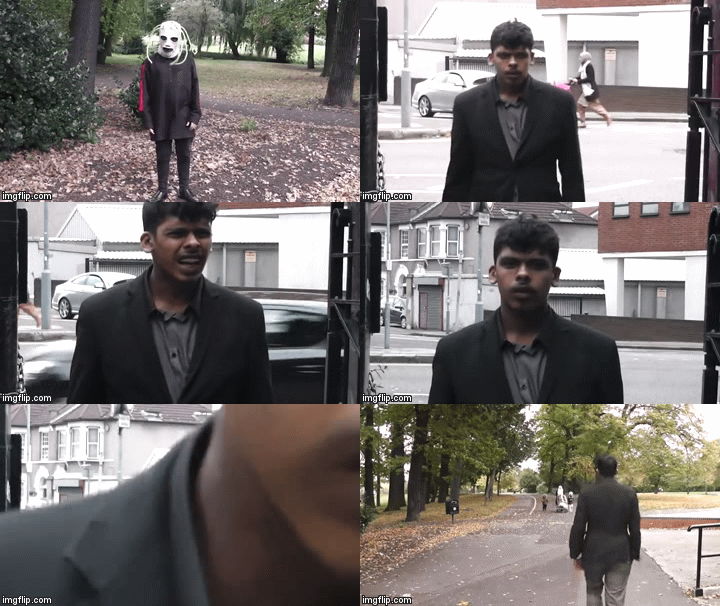
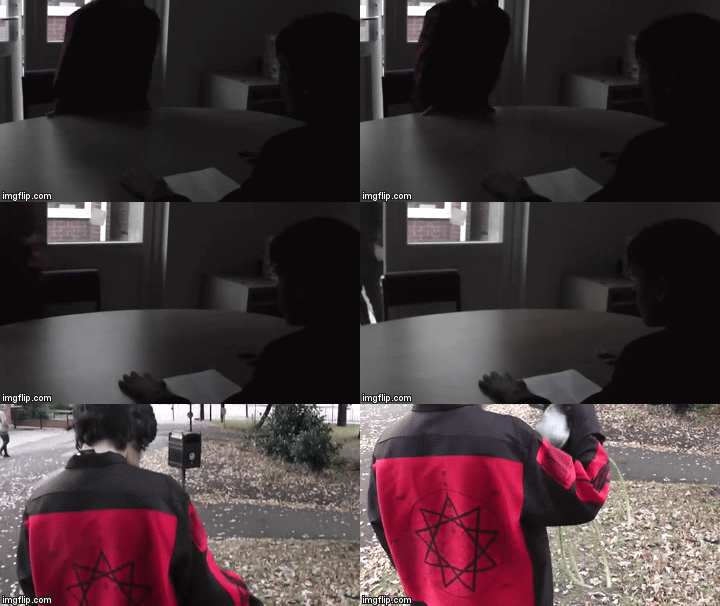
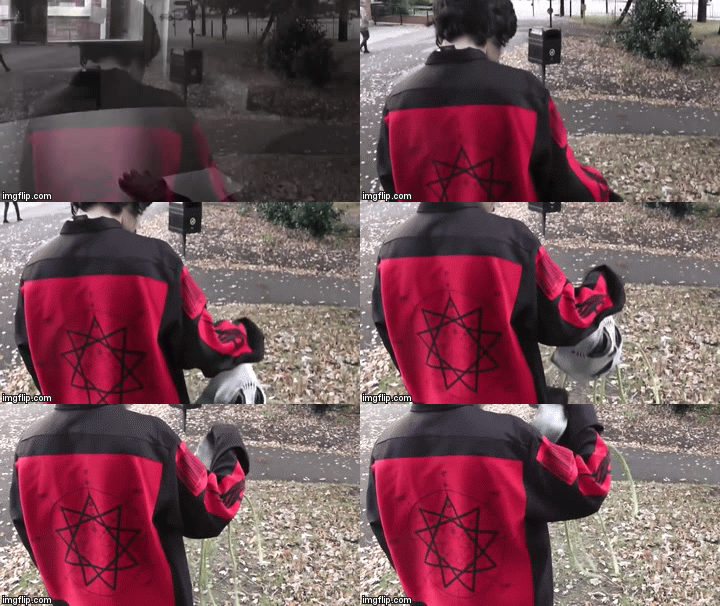
A fade is when an editor adds a dissolve between shots to make it seem like the film focuses on a new area where the story continues. This technique is usually used when the film begins and ends, this will make the film more interesting to watch. An example of where I have used this technique would be at 0:38 where the location changes from inside a meeting room, to the park where the job applicant puts on the mask and then sways his body side to side creepily, this adds a creepy vibe to the scene, whilst it fits in with the music that is playing. This is to get the audience to wait in suspense and a bit frightened while watching of what is to come.  If the fade was not included in the film, it would have just cut to the next shot without including the creepy vibe that is needed to create the scene.


Cutaways

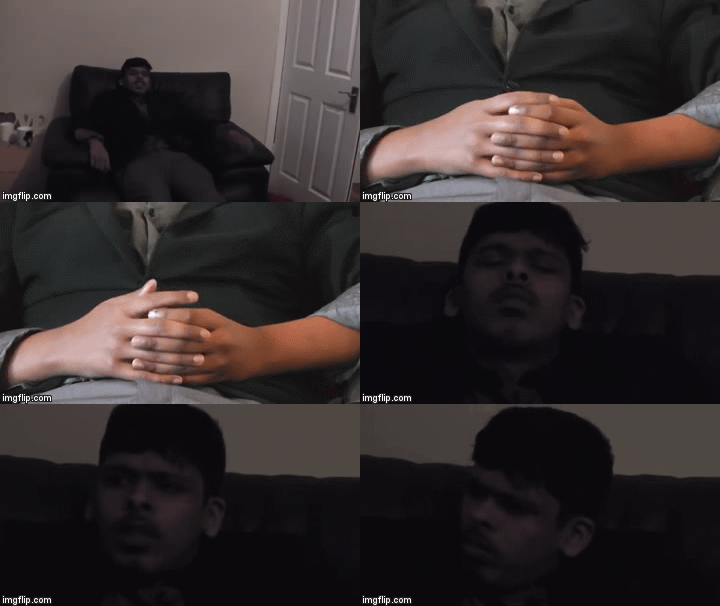
A cutaway is a shot that the editor includes that sometimes may and may not relate to the story, sometimes cutaways do not really add anything to the story, but sometimes it will give information about what is going on. There are many ways cutaways are used in films, such as when two people are talking, there could be a quick shot of someone in the conversation rolling their eyes, it does not add anything to the story, but it tells the audience that the characters might not believe that the other character is telling the truth or not interested in what the other character is saying. An example of where I used this technique would be at 1:12. Here I showed a shot of the boss twiddling his thumbs in thought and passing time. The twiddling his thumb shot doesn't add to the story line but the impact that this has on the audience is to give them a little information of the boss finally getting a chance to sit down, rest and is relaxed.


Effective Pacing

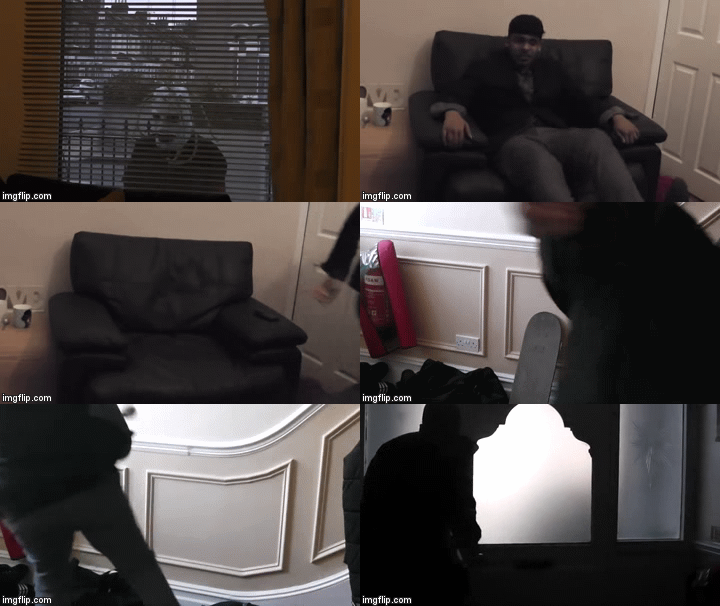
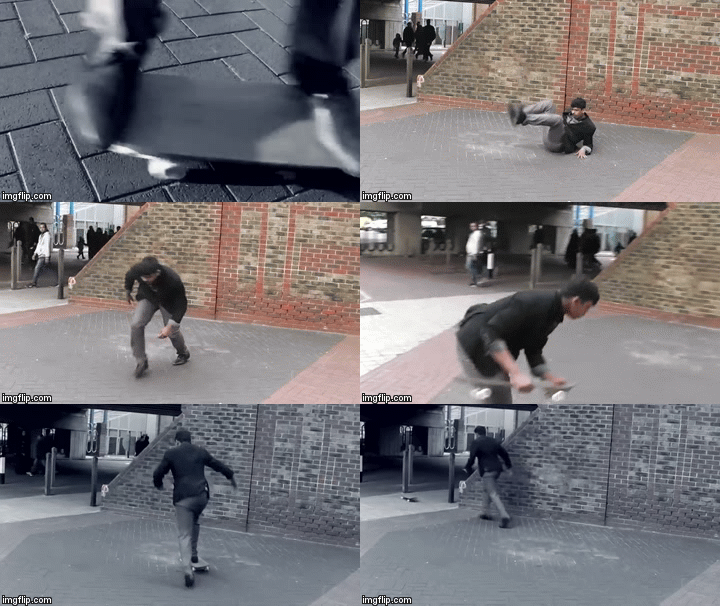
Effective pacing is when the editor makes the tempo a certain way to leave an impact on the audience. The way the pacing is done, can make the audience feel a certain way. An example of where it can be found are in some Asian dramas. When something serious happens, they show the reactions of every single person in that room being shocked, while in slow motion, this leaves an impact on the audience, getting them to also think along with the shocked characters "did this really just happen?" adding more tension and making the audience wait to see how the situation will continue. An example of where I have used this technique would be at 1:56 where the boss is trying to get away, here the pace of the editing is very quick, but shortly after there is a longer shot of the boss tripping and then getting back on the skateboard to skate away. The way this technique leaves an impact on the viewer is by having fast paced editing during the scene shows the audience that a lot is going on in the scene. This shows the boss is really rushing to get away, and by having a longer slower shot after it, when he makes a mistake and falls adds drama to his clumsiness and silliness in trying to get away again still using the skateboard.


Convey Information Effectively 

Convey information effectively is when an editor structures the shots in a certain way to tell the audience what is happening in the scene clearly. An example of where this is used in films would be when one character has a flashback, which tells the audience what has happened to that character. An example of where I have used this technique would be at 0:44 where the applicant is waving is body creepily, and then it turns out that the boss is in the same area. When the boss looks to the side, it turned out that the masked applicant is not there, so the boss thinks his mind is playing tricks and actually saw nothing so he walked off.


Use Sound To Create Impact

Using sound to create impact is when an editor uses certain sounds at a certain moment in the film to really get out an emotion from the audience. This can be used in many ways, such as when editors add sad piano/violin music during a death scene, or adding tense and thrilling music during a chase scene, using sounds like this can really make the audience feel the way that the editor wants them to feel. An example of where I used this would be at 1:12 where I made the calm, relax music stop for dramatic effect, showing the applicant in a creepy mask, which gets the thought in the audience's head "where did he come from" which makes the film tense to watch, since with the silence it makes the audience wonder what will happen next.


Synchronise Sound And Vision

Synchronise sound and vision is when an editor makes the sound match what is going on in the film with music and sound effects, such as if it is a horror scene, where a killer is creeping up on someone, they will use eerie, disturbing music, or when someone suddenly opens a door, they add a creaking sound effect, to really add that creepy vibe to the scene. An example of where I used this technique would be at 1:17 where the suspenseful music plays when the boss is trying to get away, the music hits at the exact same time when the boss's feet just hit the floor as he gets away. The way this this leaves an impact on the audience is that when the music hits just when the boss hits his feet on the floor shows that something serious is happening, and tells the audience that the boss just started to quickly get away from the applicant with the mask.


Mix Soundtracks

Mixing soundtracks is when an editor uses more than one type of music in their film. This is done in a lot of films where they switch from one piece of music to another to fit the change of shots. In horror films they quickly change to very tense music when a killer is approaching or there is a death scene, to add the suspense that fits with the scene. An example of where I used this technique would be at 0:32 where while the meeting is still going on, the music stops for a brief second and then switches to the creepy music where the student puts on the mask. This leaves an impact on the audience since the sudden change of calm, joyful music to creepy and eerie music signals that something seems a bit off, which is exactly what happens, since the audience sees that the applicant has a satanic symbol on the back and then puts on the mask, and this surprises them, the change of music really adds to the shock factor that the scene has.


Overlap Sounds

Overlapping sounds is when an editor uses different pieces of audio, and plays them at the same time to create an effect that gives a certain feeling for the audience while watching the film. An example of where this is used in films would be when someone has a sudden flashback, or where there is a scene where a character has many voices in their head, and they are all playing at the same time. An example of where I have done this would be at 0:39 where the sound of the boss saying "clearly not fit for the job" is happening at the same time as the creepy music. I played the sound of the boss saying the line "clearly not fit for the job" three times, each one gets quieter so it sounds like an echo, and this plays over the creepy music that has just started playing. By doing this having the creepy music start tells the audience that something is wrong, and at the same time, playing the boss's voice is strange, since he is not in the shot, but playing it like it is an echo tells the audience that it is in the applicants head, and playing that at the same time as the creepy music, makes the audience think he is going to do something to the boss.


Offline Edit/Online Edit

Offline editing is when an editor uses a shooting script to check all of the shots that they filmed, and see what shots they use, and what shots they discard. Online editing is when an editor uses a computer software to edit their films. All film makers do this technique for the making of their film. I used offline editing when I made a shooting script that had all of the shots that I would use in the film, and all of the shots that I will discard. I used online editing when I was actually editing the film on a mac. Doing this was very useful, because the offline editing helped me see what shots were going to be used in the film, and it made editing much easier, and the online editing allowed me to actually edit my film.

On Screen Text

On screen text is when an editor literally just adds a bit of text on the screen, this is always done in films, where they sometimes show the title of the film at the beginning and when they always show the credits at the end, this is also done when time passes by and they show some text that says how time went by, for example saying"3 hours later". An example of where I used this would be at 2:30 at the end, where it shows that I made the film. I made some credits at the end of the film, showing a fade in of text that says "By Usama Mohammad", by doing this it informs the audience on who was the person that actually made the film, so they can know their name and see if they have any other films to watch.


Image Editing

Image editing is when an editor changes the visuals of the film, by adding effects and filters to improve the looks of the film. An example of where this is used would be when film makers add transitions in their films, and change the appearance of the film to how it originally looked. An example of where I used this technique would be at 1:25 where there is a filter on the screen while the boss is getting away in slow motion. The way I used image editing, is that I added a tense filter to the shot, which made the scene seem more tense, and made it also fit in with the music. The impact this has on the audience shows that the scene is very tense, and the boss is rushing to get away, with all the serious colours.


Audio Editing

Audio editing is when an editor rearranges the audio and adds effects such as making the audio fade in and fade out, the editor sometimes also makes the audio louder or quieter than it was before, so it can improve the film. An example of where this is used in films is when there is a tense scene, and the music in the background goes quieter, so that the audience can focus more on what is going on, such as actions that are taking place, or dialogue that is playing. An example of where I used this technique would be at 1:45 where I stopped the tense music, just at the exact moment when the boss falls off the skateboard. The effect that this has on the audience is that it adds more humour, in a slapstick way to the scene, making the audience be able to know that it was a clumsy mistake that he made in a serious moment, and by having the audience be able to hear the "wait, wait, okay", adds even more humour to the scene.

Sunday, 6 November 2016

Production Reflection

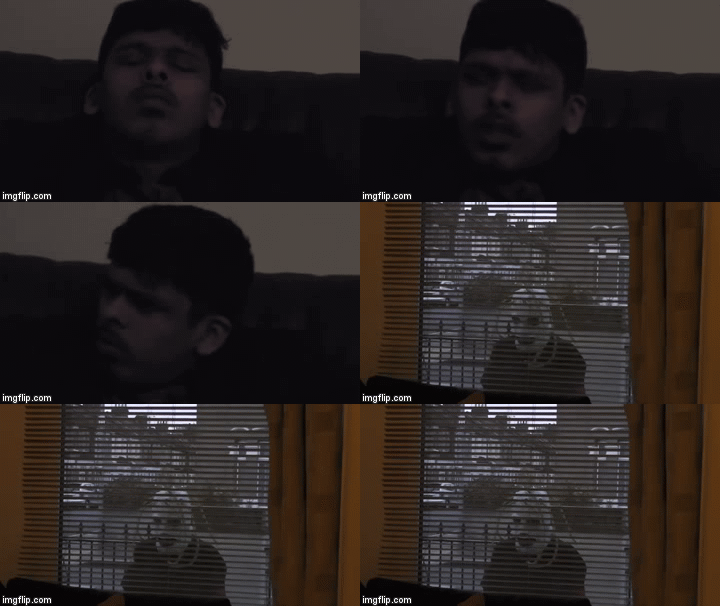
The past couple of weeks have been very busy. On Wednesday me and my group went out to film for our short film and we had managed to take  a lot of good shots, that I was really proud of and luckily managed to finish everything in the time we were given , all shots did not take that long to film, and everything seemed to go very smoothly. While me and my group were filming, it was very enjoyable to do the acting, while I had one of Arman's friends to help filming when we needed a third person, which was very convenient. Even though there were many things during the filming process that were very fortunate for me and my group, there were many things that went down that was not very fortunate for us, such as when we first started filming, we originally planned for Matthew to bring his skateboard, which is going to be used in many of the scenes, but unfortunately he could not make it for the first day of filming, so we could not film the majority of the shots, and only managed to film the shots where there was a meeting for the student getting the job at the beginning. When we were filming the interview for the start of the short film the lights where we were filming were not working, and all of them were broken and wouldn't turn on, and where the areas we placed the camera, the only times where the lighting was perfect for all shots, we would end up breaking the 100 degree rule, so we just wen't with all the best shots we could get. When filming for most of the shots, since a lot of people did not know we were filming, we had some trouble filming at times where there were no people being filmed, that are not meant to be in the short film, and we had to wait till they were not in the shot, so we could actually film, unfortunately this happened for most of the shots, but luckily we managed to do everything in time. One change that we made during filming was the beginning, when where the film starts, we were originally planned to have a pan down to the table showing the two characters having a conversation, but then we remembered that we were supposed to start with one of the characters walking in a room, so we changed to multiple shots of the student walking in and seeing the boss, which ended up looking better then we originally planned it to look. The second thing that we had to change was one of the areas, due to the fact that we could not film in the Ilford exchange we had to change to Arman's study room, which actually was a better idea, since the room actually seemed like a place that people would have a meeting in, rather than the food court in exchange. The last thing that we had to change was adding parts to the film that were not originally planned to be in the film, since during the filming we came up with shots that we thought would make the film look better, such as adding a cutaway of Arman's hands, and the student with the mask standing outside the window, these shots made the short film look more professional than we thought it would, which was very convenient. Next time I would be doing filming for a media project I would make sure that I have permission for all areas that I am planning to film, and make sure that every member in the group will be able to make it on time for the filming, and lastly make sure that when filming, make sure that nobody that is not supposed to be in the film is in any of the shots.

Friday, 21 October 2016

proposal for "the job"

Proposal for The Job

What is your Genre?

This short film is based around a comedic genre with a dark vibe to it. It has a few ideas which match the dark humour within the short film. The dark comedy includes 2 characters which go through an altercation over a job application. As a group we found that this would be a good way to display our skills and create something unique.

Who are your characters?

The employer is a typical boss like character who sits up and is a little bit snobby. He has correct dress sense and speaks well as all established employers will. The candidate is a little scruffy and weird. He has vacant looks and just screams unemployable. Its implied that he wont get the job straight away with the camera angles and how he is presented. The third alter ego is a mythical creature/ figment of the candidates imagination that then follows the employer around.

What is your setting?

It is set in modern day London but does have mythical aspect with the introduction of the strange candidate. We have open, public locations. These locations are conventional of a typical London shopping centre. It is set in the Ilford Exchange and food court the majority of the locations then take place in and around the area.

What is your story line?


It begins with an interview stage which ends badly for the candidate as he does not get the job. The employer faces the decision to not hire the candidate and the scene moves on to the reaction of the candidate, who is shocked with the decision. This altercation then causes a very strange effect on the candidate where he turns into something of a surreal nature, he starts to stalk the employer following him where ever he goes in order to get an answer the candidate follows the employer down the street, into shops and near his house, to name a few locations. This then leads to a dramatic ending as the employer receives a huge shock from the candidate and it ends badly for them both, the employer gets hit over the head with a skateboard and the candidate has left himself in a bad situation.

What is your narrative?
The short film is linear and follows one scene after another. We don't want to create any confusion within the shots as the story its self is already confusing. Everything will take place in chronological order and with the addition of a montage and a jump cut sequence we show the passing of time.

How will your film incorporate all the Section A techniques?

Shot variety in this part of the film is key as it needs to be humorous. The audience need to understand the humour in each shot. Cut aways will fill certain parts of the awkward, such as the camera moving away from the actors to a shot of someones hands, this then fills the awkward silence. The use of camera language has effects on the audiences mood to the scene, if we keep things exciting it will allow them to want to watch more. The 180 degree rule will follow a conversation between the 2 this will also allow for a shot reverse shot to take place to the follow the conversation. The sequences which display 2 editing rhythms will come in the montage which will be fast paced and quick to show the passing of time, where as the slow paced editing will come to the climatic ending where the employer gets hit with a skate board. The film will include random transitions to ensure the funny factor as we get to the random locations where the candidate is following the employer around such as; dissolves and cut between each scene, using creative transitions in between each cut to have a sense of fluidity.

How will your film incorporate all the Section B techniques?


We have shots such as a POV shot and the aspect of the conversation has the 180 degree rule and a shot reverse shot sequence. The film will include random transitions to ensure the funny factor as we get to the random locations where the candidate is following the employer around. For section B the jump cut sequence will be the montage of the candidate following the employer around. It adds to the humour of the films, we will also have a point of view shot from the angle of the employer who unfortunately sees something terrifying before he dies. It evidently just doesn't end well for him. The montage sequence will have a sound track playing in the background, this will then be cut to the soundtrack to create a sense of rhythm and humour to the whole thing.

Thursday, 20 October 2016

shooting script


call sheets


DAILY FILMING SHEET
(CALL SHEET)


Date and time: Friday 21st October 2016 3:30pm


Location: Ilford bridge
Shooting Script Shot No.s:
Cast: Arman and Usama
Props: mask
Reminders: Arman and Usama must bring in smart clothing. Usama wears mask.

  
DAILY FILMING SHEET
(CALL SHEET)


Date and time: Friday 21st October 2016 3:30pm


Location: Exchange entrance
Shooting Script Shot No.s:
Cast: Arman and Usama
Props: N/A
Reminders: Arman and Usama must bring in smart clothing. Do not forget to bring a mask and a few sheets of paper to represent the CV and application, must be in the bag at all times.

  
DAILY FILMING SHEET
(CALL SHEET)


Date and time: Friday 21st October 2016 3pm


Location: outside KFC
Shooting Script Shot No.s:
Cast: Arman and Usama
Props: Mask
Reminders: Arman and Usama must bring in smart clothing.
.


Cast List and Location List


Thursday, 13 October 2016

Purposes Of Editing


STORYTELLING

For storytelling they used one of the techniques that is used a lot in this clip is the 180 degree rule, it is first used at 0:17 where they show two of the characters looking at each other from different angles, they use this to tell the story,  when using this rule you can see they made sure that all of the subjects were all facing the right area this ensures the audience viewing the scene knows which character is watching who in the scene. it also keeps the audience engaged in watching their conversation, wanting to know what the next person will say.

The scene is made up to tell the viewer where it is set, for example the clothes the characters are wearing is old western and the props used such as the guns the hat and boots and where the scene is filmed, here its shot in a grave in the dessert. By doing this is let the viewer understand the story more, since they will know exactly where it is supposed to be set, and that will make them understand the story.

COMBINING SHOTS INTO A SEQUENCE


For combining shots into a sequence they chose certain types of music for certain scenes, to give out certain emotions for the audience to feel while watching, the use of music helps set the scene, for example at 2:00 they use very tense music to make the scene very suspenseful. While showing the three characters reaching out their guns from their pockets, there is very suspenseful music in the background which fits the scene well, since without the music the scene seems unsure, and the drama is not as intensified,it just looks like there is three people walking around in a large circle looking at each other. By using the music that they chose for the scene, the scene was able to make the audience tense while watching and make them wonder what will happen next.

CREATING PACE

For creating pace, they have certain shots cut very quickly to show what the characters personalities are like, such as at 0:20 they make the character seem very laid back person  that is very sure of himself, despite the fact that he has a gun pointing at him, they do this with a slow pace of editing, at 0:25 the pace that they used made the next character appear to be sinister,due to the pace of editing being fast. The third character at 0:26, they make the shot last longer than the other two to give the audience an idea of him being rather useless compared to the other two.

They use a long pace of editing at 2:08 to build more tension to what is happening, by having the scene lasting so long, it makes the audience ask many questions to themselves while asking, such as if one of them will die, and who will die, and will somebody actually get out their gun to shoot someone, and many more, this helps build even mor tension to the scene, and all the audience can do is wait and see.


Sunday, 9 October 2016

The Development of Editing

Before Editing

The first use of film: Lumiere Brothers

The first ever camera made for film was invented by the Lumiere Brothers on 13th of February 1895, they called it the "cinematograph". These two brothers were able to shoot the first ever footage to be recorded in history and filmed on the 19th of March 1895. The two began to film whatever they thought they could film, just so they could show the public their new invention. The cinematograph filmed with no sound, no color and had a very small screen ratio. The first thing the brothers filmed was of workers leaving the Lumiere factory. This was the first ever time the public experienced of a piece of film.The second thing that the brothers filmed was a train coming to a station, which surprised a lot of people when presented and it frightened the audience and made them jump back as they were unsure of it and some felt what was shown on screen was actually happening in the room with them.


This was a huge milestone for the Lumiere Brothers as it was the first ever time that there was a piece of technology that was able to show what was happening in the real world and could be presented on a screen for the public to view. They were able to record two pieces of film both done in one single shot of less than a minute, lasting 46 and 49 seconds, it was a massive achievement as it was the first time any thing like had been done and made a huge impact on film history, these two pieces of film started history for millions of film makers for the near future.

Before Editing

Beginning of Film Stories: George Albert Smith

In 1897 George Albert Smith became the first man that was able to use film to tell a story to an audience. Just like before the film that was shot is still using one single long shot, but the action that they chose to film was like how you would watch it in a theater, however done from just one position. At the time the audience did not mind the fact that it was simply just one shot since they were not really used to seeing many shots in the first place. George Albert Smith made a short film https://www.youtube.com/watch?v=lFZFo8XXLoM that lasted 35 seconds, in that 35 seconds the audience were able to witness a story between two men fighting which would have captured the audiences interest watch.


This was a very big milestone in the film history, since it was a new way film makers found to entertain the audience, before they just showed whatever they could film just because they can film and capture something happening at that moment in time to view later, but now they have people acting and telling a story to really give a good show to the audience. This milestone led the way for film makers to be able to film scenes of acting and follow the footsteps of George Albert Smith making millions of films with stories to come to the public eye.

In-camera editing

First use of multiple shots: Robert W. Paul

Robert W. Paul's 1898 "Come Along Do!" was the first film to use more then one shot when filming whilst telling a story, he was the first person to use film editing that involved the action of moving from one sequence to another, he also established continuity.  Although the film was short it told a story of an elderly couple sitting on a bench outside an art exhibition. Even though there was no sound Robert had signs up with arrows ('Art Section') telling the viewer what was through the doors to the actors right. it showed the couple sharing their lunch before entering the 'art section'. He then cut to the next scene where he used two still photo's instead of continuing to film, of  the couple looking at the art displayed and then ended his short film.


This was a milestone for films because it was the first time that the audience could actually see the title of the film, it was also the first time that the audience could see what happens after the shot, this was also the first time where there was actually a second shot in a film. This milestone has lead other film makers to get the idea to get more than one shot in a film, and show the audience the title and everything that happens in the shots.

Following the action

Cutting between shots: George Albert

In 1899 the same person that was able to film while telling a story, has made "As Seen Through the Telescope"  where in the main show, it showed a street scene where there was a young man who was tying it out for his girlfriend and then caressed her foot, while this was happening an old man was watching them with a telescope, which explains why the title of the film is "As Seen Through the Telescope". At the time this was very revealing for a woman's body, which is why the man was watching them.


This is a milestone as it was the first time in a film where there was a point of view shot done with a telescope, you can see on 0.13 in George Albert's "as seen through the telescope"  he used this technique, the audience found this very fascinating to watch as it was something they haven't seen in a film before, it made people wonder how the shot was actually created. This short film also told a cheeky story, again like previous films without having any sound.

Multiple points of view

Beginning to establish rules: James Williamson

 1900 was the year where James Williamson made a film called "Attack on a China Mission Station". The first shot in this film contained a gate for the mission station from the outside being attacked and was busted open by the Chinese boxer rebels. Right after they show the gate being attacked there was a cut to the mission station's garden where there was armed part of British sailors who arrived and defeated the Chinese boxers.


This is a milestone because this was the first ever film to use the 180 degree rule, also known as the "reverse angle", it was also the first ever film to use match on action in it. The techniques that were used in this film has helped the film makers to be able to tell a story by using the camera. The way this film is made seemed very similar to films that we see today, and this film has lead to so many film makers in the future to use the same techniques when making their films.
Shot Variation 

DW Griffiths

In 1915 DW Griffiths made a very long film titled "The Birth of A Nation" which is a very famous movie, because before this film was made films made the audience members pay to see a star, and that they would want to see the whole person, who is the main star. DW Griffiths though that if he moved the camera a bit closer to the subject and used a close up, there would be more details to reveal about the subjects face, so that the audience can see a characters exact expression, with a lot more detail, and it helped tell the audience how to feel when a certain scene is going on. 


This is a very big milestone because of how long the film was. This was the first ever film to be nearly 2 hours long and ran for 1 hour and 53 minutes, and at the time this was the longest ever film. This film used cross cutting to show multiple things happening at the same time and it showed flash backs and the scale and issue, which had not been done before at the time.

Manipulation of diegetic time and space 

Establishing use of montage: Sergei Einstein 

Sergei Einstein made "Battleship Potemskin" in 1925 where he described the Odessa Steps sequence as a "Rhythmic Montage" and he cut to a certain beat in a film,m he gave a methodical impression of the scene. Since Einstein was a director he pointed out the beat of the drum with the marching of the solders constantly come in off beat. Einstein created a sensation that is something that is not right and has things that are not how they should be. The choice of rhythm in the scene was transferred from the solders to a baby in a carriage, by showing it it made the audience feel sympathy for the baby in the carriage


This film was a very big milestone since it was the first ever film to use a montage, which helped create the editing pace. By using a montage they picked out the most important parts of the scene, and placed them all together to show the audience. The use of montage helped inspire many film and video makers in the future to make trailers and music videos.

Analogue (AKA linear) Editing 

Moviola editing: Iwan Serrurier 

In 1917 Iwan Surrurier's made their original concept for the Moviola, and was a home movie projector, and was sold to the public. This machine was very expensive since it costed $600 in 1920, which was equivalent to $20,000 in the 2000s, because of this reason very few of them were sold, since not that many people could afford to buy it. In 1994 the first ever moviola was sold to Douglas Fairbanks, and 94 years later he had a framed copy of the original receipt, for the moviola. With the moviola all editing was done by just cutting a film and them pasted it, and mixing the film together by hand, it seemed to be a very long process, but the moviola sped up that process, by magnifying the shots and them speeded up the cutting process. In just a decade the moviola was the main industry for editing videos. 

https://vimeo.com/117756839


This is a mile stone because it was the first time were there was voice and sound in films, and it was the first time when film makers could rewind a shot, and it allowed the transitions to be easier. With all this it allowed the film makers of the future to make millions of films containing sound.

Film > video

Moving to digital formats 

Film reels is what was typically used for all films, but they were very tricky to use and they consumed a lot of time to edit. In every film made before 2001 they all used film reels, even every film made in Hollywood. Now film is already digested so the editing does not consume so much time with the new technology. Until the development of high quality digital video, definition for videos was not better than VHS, so it was unsuitable to use for the making of a professional film. The first film that had a big budget was shot and released in HD was "Robert Rodriguez's Once Upon A Time In Mexico"


This is a milestone because it was the first time where films were shot on a film reel, and it was the first time where film makers were able to use CGI effects in their films, the films were also shot entirely on video tapes, and some were even entirely filmed on iPhone's. Because of this milestone this lead to so many films in the future to use CGI and being able to use film reels to make their films.

Digital (AKA Non-Linear) Editing 

A slow progression

Non linear editing and digital editing are both developed from the 70's onwards. It involved using a computer software app, instead of using a moviola to assemble the footage. This is also known as non destructive editing, where the original film is preserved, instead of being cut up during the editing. Non linear editing started with computer effects. even though these computers were used for some elements, they were still edited traditionally with a moviola. Editing like this continues well into the 90's, and was very successful with films. The first film that was edited using just digital methods was "Lets Kill All The Lawyers" which was made in 1992.

This is a milestone because it was the first time where film was edited on a computer, and set the standards for today's digital edited movies. Not that many film makers chose analogue editing methods, while it may not have been noticeable, digital editing revolutionized what time it took to make films, and revolutionized the quality of special effects in films, which lead to millions of films in the future to look even more professionally made and that made millions of audiences to enjoy the film even more.


Thursday, 22 September 2016

Editing Conventions and Techniques

Seamless/Continuity


Seamless/Continuity editing is when shots flow into another shot and is done very smoothly and  slowly. This keeps everything staying as fluid as possible which makes it look like the scene has no gap of editing done, which sometimes seems pleasing to watch.There are many ways this can be used, such as action scenes and conversation scenes.

An example of where the techniques is used is from the show called 'The Jeremy Kyle show where they have very slow editing to make the audience to see the details of what is happening around the subject. This wil build up the emotions for the viewers to find out if the son is actually their.

They show this at 0:04 as all of the scenes run very smoothly and don't cut to the next one straight away. This type of editing helps making the audience feel like they are actually there and they are able to follow what is going on in the scene in a high quality way. I have had my own experience with this editing technique when I helped film a live TV show with very slow editing.


Motivated


Motivated editing is when you cut to something that is not in the frame and then cuts to another different scene or something that is still in the set. This type of editing hints the dialogue of the next shot, usually they show someones reaction to a situation that is occurring in the scene, which is usually between scared, surprised or happy.This type of editing is usually done in scenes where someone is having a flash back or a horror scene. An example of this would be in The Simpsons at 2:07 where in this episode Homer tries to save the power plant from exploding and make sure nobody there dies. They did this to show all the people exercising were clueless what was going on, while at the same time doing a count down, which adds even more tension to the scene. This type of editing is mainly used to add tension and suspense to the scene, or to add any emotion, they also give information of what others in the scene feel about what is happening. I have not actually done any motivated editing in any of the projects that I have done for media so far.

 Montage


A montage is basically when you make a collage of loads of videos and put them together to make a collection of videos. This type of editing is always used in music videos and trailers, they are also used in showreel's to show all of the different parts of the videos done. An example of where this is used would be in slipknot's music video "The Devil In I". where they have showed multiple shots of videos put together such as at 1:29  where they use a bunch of clips edited slowly to build tension and then they cut to a lot of scenes to build excitement of what just happened. This builds a lot of different emotions for the viewer while watching. When editing is done like this it helps keep the audience entertained by having all these videos showing up quickly after one-another builds up excitement. When I helped produce a music video for media I used this type of editing, I also used this technique when making my showreel.

Jump-Cutting


Jump-cutting is when a scene stays in the same set but then jumps several times and makes sure that it is in the same shot but jumps forward in time. An example of this would be in Captain America Civil War where there is a battle in an airport, they start using it at the beginning at 0:02 where it shows Captain America confused of what happens, then showing  Iron Man and Black Panther flying towards him. They jump to a bunch of scenes at 0:17 where the fight begins, this helps build excitement, showing the viewer everything that is happening, this will lead to the viewer wanting to watch more. I have done jump-cutting before when I did a video titled "NO HOMEWORK" where I used a lot of jump-cutting to show everything that was going on in the scene.

180 degree rule


The 180 degree rule is when there is an invisible line that the camera should never cross, it makes sure that the subjects are all in the right area, making sure that they are looking the right way. The 180 degree rule is always used in scenes where there are conversations, such as in the movie Goodfellas where they are having a conversation in a restaurant. At 0:03 they start cutting to both sides of the table, making sure that all of the people in the scene are facing the right way when talking to each other. The reason why the 180 degree rule is used is that so that the audience don't get confused, such as if there is a conversation between two people, they are on opposite sides, if both of them are looking in the same direction, it would get the audience very confused to understand who they are talking to, but if they are looking in the right direction the audience wont get confused.


Splicing/Transit icons, eg cut, dissolve, fade, wipe


Splicing/Transit icons is when shots go to the next shot in certain ways, either simply fading in or out of it smoothly or cutting right into the next scene. Sometimes this technique helps visually communicating with the audience. This technique is typically used with flash backs when they fade into a flash back or a dream or remembering something that happened in the past. This is done in the Pokemon series at 0:18 where the character Ash remembers the time he met Charmander, this runs very smoothly as they faded right into the shot, telling the audience that it is a memory from the past. This type of editing makes scenes much more enjoyable to watch. In the past I have made a music video that has some fades in it, showing some flash backs, which is the same as what is happening here.

Cutaways


A cutaway is when there is a filler shot that cuts away from the scene showing other things that are going on in the scene, such as other peoples reactions, or something quick happening for a few seconds as someone looks away. In the movie Divergent, they used cutaways at 0:06 they show the woman being thrown over the bridge and then cuts right to the other group of peoples reaction to what just happens, they did this to show the viewers how to feel to relate with how the people in the cutaway feel, since it was very sudden, they want the viewer to feel shocked, which is why they used a cut away to show the quick movement and the shocked reactions. In my video called "NO HOMEWORK" I use a cutaway with the students reaction to show how  he felt.

Point of view shot


A point of view shot is when there is a first person perspective in film or TV, these type of shots typically go on for 3 minutes. here's an example of where this is used in the Family Guy episode Point Of Stew we notice at the beginning at 0:01 they made it look like the viewer is the character Stewie going around the town. This technique is mainly used to get the viewers attention, and engage them more into what is happening, since it is a technique that you don't usually seem to find in TV and film that often. I currently have no experience with doing point of view shots in any of the videos that I have done.

Shot-reverse-shot


Shot-reverse-shot is when there are 3 shots that are repeated between two people, this is done very similar to how the 180 degree rule is done. An example of this being used is in Spider Man, at 1:21 they show the man talking to the evil version of himself in the mirror, they made the shots repeat over and over again, but continues the conversation. The reason why this is done is that it is an easy shot to do and it catches peoples reaction. It mimics how the viewer follows the conversation, it also shows the most interesting parts of the scene. I have done shot-reverse shot in the Wayne's World swede that I helped make, so I have some experience with this technique.

Providing and withholding information


Providing information is where the editor cuts to enhance the viewers knowledge of a scene and shows what exactly is happening, giving more information in the process. An example of this is done in Full Metal Alchemist: Brotherhood where they reveal how the character Alphonse lost his body, they do this at 0:40 where they show the two children excitedly ready to bring their mother back, but then not knowing the outcome, this helped the audience realized how exactly he lost his whole body, so this managed to finally inform the audience about what happened.

Withholding information is the exact opposite of what providing information is, it does not give the information till the very end. An example of withholding information would be in the film Psycho where they show the woman having a shower, then at 0:44 shows a man with a knife in the background, this leaves the viewer in suspense, wondering if she is going to get killed or not, this also gave the information that she did end up getting murdered by the mysterious man. Both of these are made to make the viewer feel the suspense and tension of the scene now knowing all information makes it more enjoyable to watch and keeping the information hidden from them makes them curious and wanting more.

Editing rhythm


Editing ryhem is basically fast and slow paced editing that shows how characters are feeling, so gives more emotion where fast shows where a lot is going on. An example of this would be in the trailer for Pirahna 3D where it has very fast paced editing. You can see at 1:04 it shows that there is a lot of things going on which gives a specific feeling of the scene and it makes the audience sit at the edge of their seat while scared at the same time. I have some experience with editing rhythm as I did fast paced editing when making a music video.

Parallel editing/Crosscutting


Parallel editing/ crosscutting is when in a scene, it cuts from one line of action, location or narrative, to another, within a single scene. An example of where this is used would be a race scenes or when someone is telling a story, so that the viewer can see everything that is happening in the scene, another example of where this is used would be in the movie Edward Scissorhands where at 0:19 a woman is telling a story and then it cuts to another scene but still has the voice of the woman talking. The reason why they did this is show the viewer what she is talking about. As though she is narrating while the scene of what she is talking about is shown, so the viewer visualize what she is talking about from her memory. I have taken part in the live day show "Listen Up!" which contained crosscutting, so I have experience with it, and have knowledge about it.

Cutting to soundtrack


Cutting to the soundtrack making the scenes cut to the music and make it cut to the beat. Most of the time this is done in music videos, which explains why an example of this would be in Steam Powered Giraffe's cover of  "I love it" where hey cut to the beat a lot throughout the video, they do this at 0:11 where they show different scenes and make it cut right to the beat of the song. This makes it more exciting for the viewer to watch. Since having the video cut to the sound track of the song, it makes the music video seem like it is done on a professional level. This also makes the viewer enjoy the video even more. I  have some experience with cutting to the soundtrack when I cut to the beat of the song in the music video that I helped make.